How to set up subscriptions or recurring orders in Shopware 6?
Quick Answer
Shopware 6 does not include advanced subscriptions out of the box, so most stores set this up with a subscription extension plus recurring payment support from Stripe, Mollie, or PayPal. The setup usually includes subscription products, tokenised payment methods, scheduled renewals, and customer self-management inside the account area. The steps below cover the full setup flow, common failure points, and what to test before going live.
Before You Start
- ✦ Recurring-capable payment gateway — subscriptions fail immediately if the gateway cannot store payment tokens securely.
- ✦ Subscription extension compatibility check — many plugins break after Shopware core updates if versions are not aligned.
- ✦ Stable cron or scheduled tasks — renewal orders depend on background jobs running on time.
Choose a subscription approach
Start by deciding whether you need simple repeat ordering or true automated subscriptions. They are not the same thing. Simple repeat ordering lets customers reorder manually. Real subscriptions create scheduled renewal orders automatically and charge stored payment methods in the background. Most stores use a commercial Shopware extension tied to Stripe or Mollie because custom subscription logic becomes expensive very quickly once retries, failed payments, VAT, and customer pauses enter the picture.
- Define whether billing is weekly, monthly, or custom interval
- Select a plugin with active Shopware 6 support
- Confirm your gateway supports tokenised recurring billing
Install the subscription extension
Install the extension in a staging environment first. This matters because subscription plugins often override checkout logic, cart calculations, and order processing. Those are the three places where Shopware upgrades usually expose compatibility problems. After installation, clear caches, compile the administration, and confirm the plugin creates its scheduled tasks correctly. If your queue worker or cron is misconfigured, renewals will silently stop processing after launch.
- Install the extension in staging first
- Run plugin migrations after activation
- Verify scheduled tasks are visible and active
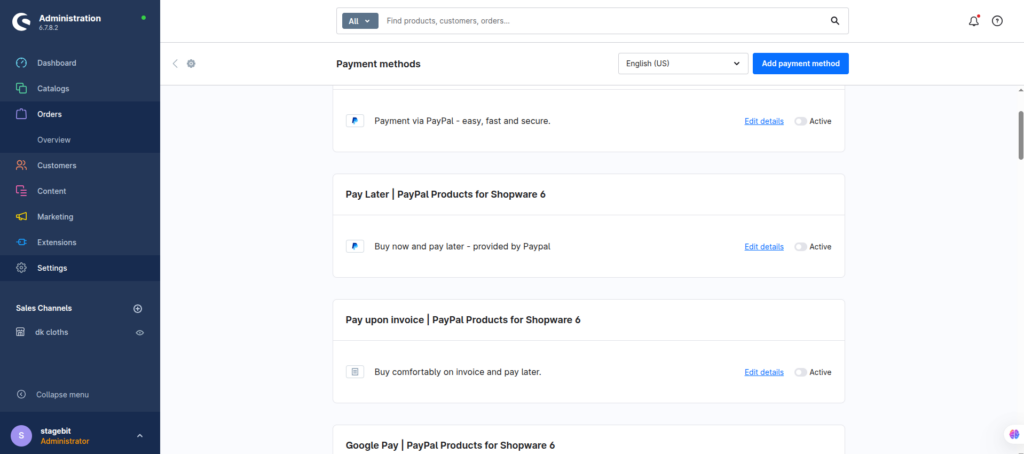
Configure recurring payments
The payment layer is where most subscription projects succeed or fail. Your gateway needs to support token storage, automated rebilling, failed payment retries, and webhook callbacks. Stripe and Mollie handle this well inside Shopware. PayPal setups vary depending on the plugin version. Configure webhook URLs correctly and test payment expiry handling because expired cards create renewal failures months later when nobody is watching.
- Enable token storage for recurring billing
- Configure gateway webhooks and callbacks
- Test failed payment retry behaviour
Create subscription products
Configure which products can be purchased as subscriptions and define renewal intervals carefully. Physical consumables work well. Highly customised products usually do not. You also need to decide how discounts behave during renewals because promotional pricing often creates accounting confusion later. Most mature setups separate one-time checkout discounts from recurring subscription discounts to avoid margin problems.
- Enable subscription mode on supported products
- Define billing intervals and delivery cycles
- Separate acquisition discounts from renewal pricing
Set customer management rules
Customers expect to pause, cancel, skip, or change delivery dates themselves. If your setup forces support tickets for every small change, subscription churn rises quickly. Configure the account area so customers can manage subscriptions without admin involvement. Also define cancellation cut-off rules early because shipping teams usually need a processing buffer before renewal dispatch starts.
- Enable self-service cancellation and pause actions
- Define renewal cut-off timing clearly
- Send reminder emails before renewals process
Test the renewal lifecycle
Before launch, simulate the entire subscription lifecycle from signup to renewal to cancellation. Test successful renewals, failed payments, skipped deliveries, expired cards, tax recalculation, and customer notifications. Most stores only test the happy path once and miss the background automation problems that appear days later. Subscription systems are operational workflows, not just frontend features.
- Create test subscriptions with multiple intervals
- Simulate failed and expired payment methods
- Confirm renewal orders generate automatically
Shopware Subscription Setup Checklist
0 of 8 completeMistakes Most Developers Make
! Using unsupported payment methods
What happens: Renewal orders generate but charges fail automatically.
Fix: Use gateways with recurring token support and test webhook processing before launch.
! Ignoring scheduled task failures
What happens: Renewals stop processing after updates or server restarts.
Fix: Monitor cron execution and alert on failed scheduled tasks.
! Mixing discounts with renewals
What happens: Customers keep receiving acquisition discounts forever.
Fix: Separate introductory promotions from recurring subscription pricing rules.
! Forgetting customer self-service controls
What happens: Support tickets increase and churn rises after launch.
Fix: Add pause, cancel, and delivery management directly in the account area.
Key Takeaway
The short version: successful Shopware 6 subscriptions depend more on payment automation and operational workflows than the frontend subscription widget itself. Use a stable subscription extension, pair it with a gateway that supports recurring token billing, and test failed renewal scenarios before launch. Most subscription problems appear weeks later when cron jobs fail, cards expire, or cancellation handling is unclear. Build customer self-service controls early and keep discount logic simple. Start with Step 3—that one alone handles most of it.
Related Answers

Still need help?
Talk to our Shopware experts
We've handled GDPR/CCPA compliance for dozens of EU & US Shopware stores.