Can I keep URLs and 301s when moving to Shopware 6?
Quick Answer
Yes—you can usually keep most of your existing URLs when moving to Shopware 6, and you should redirect anything that changes with 301 redirects. The safest migration setup is to preserve category, product, and CMS paths where possible, then map every changed URL into a redirect table before launch. Stores that skip this step often lose rankings, indexed pages, and long-tail traffic within the first few weeks after go-live.
Before You Start
- ✦A full URL export — you need every live URL from the old store before migration work starts.
- ✦Access to Google Search Console — this helps you catch missed redirects after launch.
- ✦A redirect mapping sheet — every old URL needs a destination, even discontinued pages.
Export existing URLs
Start by collecting every indexed URL from the current store. Pull data from your XML sitemap, crawl tool, analytics platform, and Search Console. This becomes your SEO baseline during migration.
- Export product, category, CMS, blog, and filtered URLs
- Remove duplicate or parameter-heavy URLs
- Mark high-traffic pages separately for testing
Match URL patterns
Shopware 6 gives you control over SEO URL templates. Try to keep your existing slug structure close to the old platform, especially for product and category pages.
- Reuse current product slugs where possible
- Keep category depth consistent with the old store
- Avoid changing URLs only for “cleaner” formatting
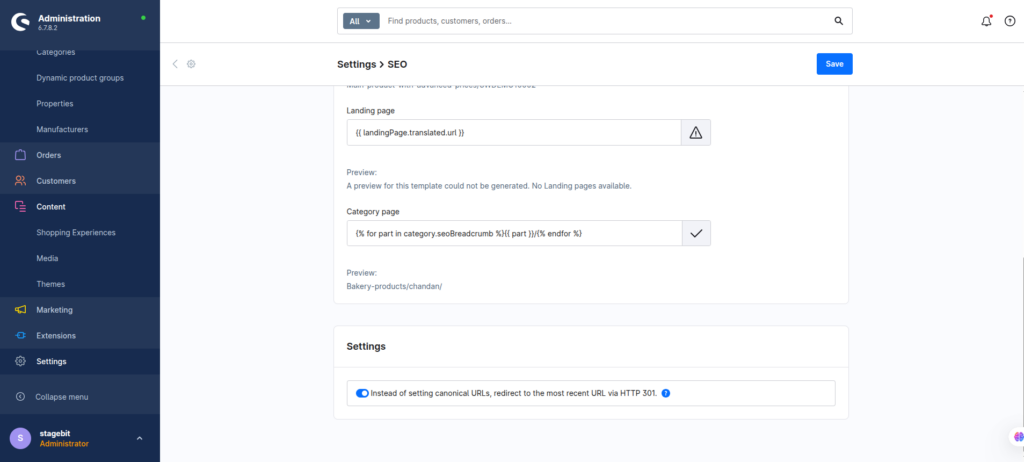
Create redirect rules
Every changed URL should point to the closest matching page on the new store. Use permanent 301 redirects only. Temporary redirects create SEO confusion and weaker index transfer.
- Map old URLs directly to equivalent pages
- Redirect removed products to the closest category
- Import redirects in bulk for large catalogs
Test every redirect
Before DNS cutover, crawl the staging store and validate redirects in bulk. Focus first on pages with backlinks, revenue traffic, and strong rankings.
- Check for redirect chains and loops
- Verify canonicals after migration
- Submit the new sitemap after launch
Shopware SEO Migration Checklist
0 of 6 completeMistakes Most Developers Make
! Redirecting everything to homepage
What happens: Rankings drop because Google sees weak page relevance.
Fix: Redirect each URL to the closest matching destination.
! Changing slugs without reason
What happens: You create thousands of avoidable redirects during launch.
Fix: Preserve existing URL paths wherever Shopware allows it.
! Forgetting non-product pages
What happens: Blog posts and landing pages return 404 errors after launch.
Fix: Include CMS, blog, and campaign URLs in the migration sheet.
Key Takeaway
The short version: you can absolutely keep SEO value during a Shopware 6 migration if you preserve existing URL structures and build proper 301 redirects before launch. Most migration traffic losses come from missed URLs, redirect chains, or unnecessary slug changes. Export every indexed URL, keep paths stable where possible, and test redirects on staging before DNS cutover. Start with Step 1—that one alone handles most of it.
Related Answers

Still need help?
Talk to our Shopware experts
We've handled GDPR/CCPA compliance for dozens of EU & US Shopware stores.