How to collect company VAT IDs and validate them at checkout?
Quick Answer
Shopware can collect and validate VAT IDs directly during registration and checkout using the built-in customer fields, tax rules, and EU VAT validation integrations. The key is configuring company account fields correctly and validating VAT numbers before tax-free checkout is approved. Below is the exact setup process most B2B and EU cross-border stores use in production.
Before You Start
- ✦ Business customer accounts enabled — VAT collection only works properly when company fields are available during registration.
- ✦ Correct EU tax configuration — Your tax-free rules depend on country mappings and sales channel tax setup.
- ✦ Access to plugins or custom development — Native Shopware fields collect VAT IDs, but automatic validation usually needs an extension or API integration.
Enable company registration
Start by enabling company account registration for the sales channels that need VAT handling. Shopware already includes business account fields like company name and VAT ID, but many stores leave them disabled or optional. That creates inconsistent customer records and tax issues later. If you sell B2B inside the EU, make VAT ID collection part of the registration flow from day one.
- Enable company account registration
- Show the VAT ID field during signup
- Make company name required for B2B customers
Configure EU tax rules
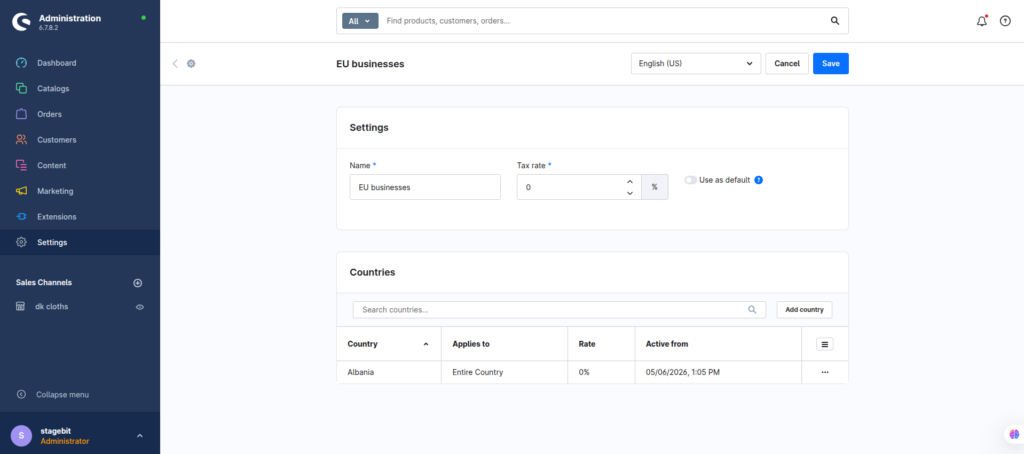
VAT validation only matters if the tax rules react correctly afterward. Configure intra-community tax exemptions for valid EU business customers and standard VAT rates for everyone else. Most failed setups happen because the VAT field exists, but tax rules never change based on customer status. Test this with multiple EU countries before launch.
- Create tax-free rules for valid EU businesses
- Assign customer groups correctly
- Test domestic and cross-border checkout flows
Add VAT validation logic
Native Shopware stores the VAT ID, but it does not fully validate EU numbers out of the box. Most stores use a VIES integration plugin or custom API validation during registration and checkout. The goal is simple: block invalid VAT numbers before the customer receives tax-free pricing. This also reduces accounting cleanup later.
- Install a VIES validation plugin or API integration
- Validate VAT IDs during registration
- Store validation results inside customer records
Control tax-free approval
Not every store should instantly approve VAT exemptions. High-risk industries and wholesale stores often require manual review before enabling tax-free ordering. A safer setup is validating the VAT ID first, then moving the customer into an approved B2B group automatically using Flow Builder or a custom workflow.
- Create approved B2B customer groups
- Use Flow Builder for automatic assignment
- Require manual review for suspicious registrations
Test the entire checkout
Always test registration, account edits, checkout recalculation, invoices, and ERP exports together. VAT handling failures usually appear after checkout—not during form submission. Run tests with valid and invalid VAT IDs from multiple EU countries and confirm invoice totals stay correct throughout the order lifecycle.
- Test valid and invalid VAT numbers
- Verify invoice tax calculations
- Check ERP or accounting exports
Shopware VAT Validation Checklist
0 of 6 completeMistakes Most Developers Make
! Skipping VIES validation
What happens: Invalid businesses receive tax-free pricing.
Fix: Validate against the official EU VIES service before approving exemptions.
! Mixing B2B and B2C groups
What happens: Tax rules become inconsistent across checkout and invoices.
Fix: Use separate customer groups and dedicated tax conditions.
! Forgetting invoice testing
What happens: Checkout totals differ from accounting exports.
Fix: Test invoices, refunds, and ERP syncs before going live.
Key Takeaway
The short version: Shopware already supports VAT ID collection, but proper EU B2B handling needs tax rules, customer segmentation, and real validation logic connected to VIES. Most problems come from treating the VAT field as simple form data instead of part of the tax engine. Keep new customers taxable until validation succeeds, then automate approval with customer groups and Flow Builder. Test invoices and accounting exports before launch. Start with Step 2—that one alone handles most of it.
Related Answers

Still need help?
Talk to our Shopware experts
We've handled GDPR/CCPA compliance for dozens of EU & US Shopware stores.