How to create geo‑personalized homepages for EU/US markets?
Quick Answer
You can create geo-personalized homepages in Shopware by combining Sales Channels, Rule Builder, dynamic CMS blocks, and geolocation logic. Most EU/US stores use this setup to show different currencies, shipping promises, hero banners, promotions, and category layouts based on visitor region. The setup is not difficult technically—but the structure matters if you want to avoid duplicate content, cache issues, and SEO problems later.
Before You Start
- ✦ Separate EU and US pricing logic — tax-inclusive EU pricing and US tax-exclusive pricing usually need different storefront behaviour.
- ✦ A CDN or reverse proxy strategy — homepage personalization can break full-page caching if you structure it incorrectly.
- ✦ Country-specific content assets — prepare localized banners, shipping copy, currencies, and promotional messaging before building rules.
Split markets properly
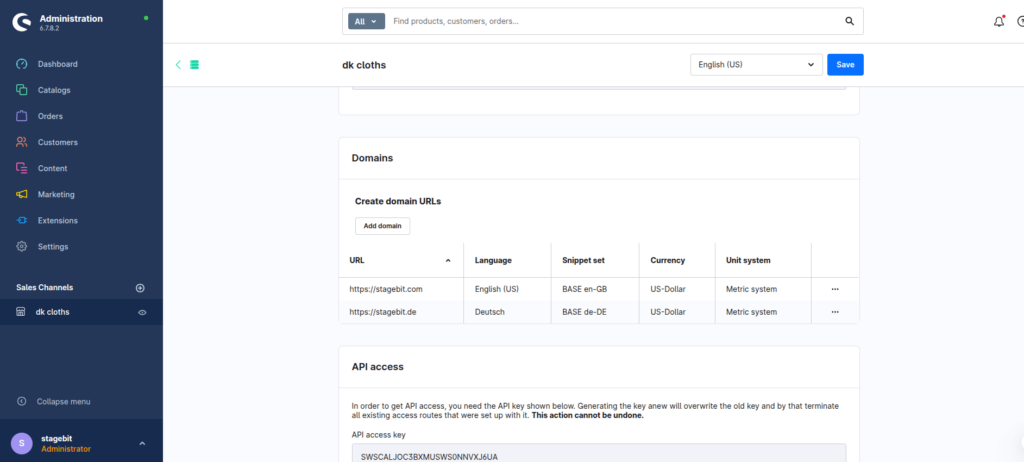
Start by deciding whether EU and US traffic should share one Sales Channel or run separately. For most mid-market stores, we recommend separate Sales Channels with shared product data underneath. That gives you cleaner currency handling, region-specific navigation, localized SEO metadata, and independent promotions. Trying to force everything into one storefront usually becomes messy once VAT logic, shipping promises, and localized campaigns start diverging.
- Create separate EU and US storefront domains
- Assign country groups and currencies correctly
- Configure language inheritance separately
Configure geolocation rules
Use Rule Builder to define visitor conditions by country, shipping location, currency, or customer group. Most stores create separate rules like “US Visitors”, “EU Visitors”, and “German Customers”. These rules become reusable across CMS blocks, promotions, shipping methods, and product visibility. Keep the naming consistent from the beginning—otherwise your personalization setup becomes impossible to maintain after six months.
- Create region-based customer rules
- Group rules by market instead of campaign
- Reuse rules across CMS and pricing logic
Build region-specific CMS layouts
Create separate homepage layouts for each market instead of trying to hide individual blocks conditionally everywhere. EU stores usually need VAT messaging, GDPR-friendly trust copy, and localized delivery expectations. US storefronts often push fast shipping, financing, and promotional urgency more aggressively. Separate layouts are easier to test, cache, and optimize. They also reduce editor mistakes when marketing teams update campaigns themselves.
- Create dedicated homepage layouts per region
- Assign localized banners and CTAs
- Show region-specific shipping messaging
Handle SEO and indexing
Geo-personalization creates SEO problems fast if Google sees multiple versions of the same homepage without clear regional targeting. Use separate hreflang tags, localized metadata, and stable regional URLs. Avoid aggressive IP redirects for first-time visitors. Googlebot mostly crawls from US infrastructure, so forced redirects can accidentally block EU versions from being indexed properly.
- Configure hreflang correctly per region
- Use stable localized homepage URLs
- Allow manual region switching
Test caching and fallback logic
This is the step most teams skip. Test how homepage personalization behaves with Varnish, Cloudflare, Fastly, or your CDN cache layer enabled. We regularly see stores showing EU banners to US visitors because cache variation rules were incomplete. You also need a fallback experience for VPN traffic, unknown regions, and crawlers. Good personalization should fail gracefully instead of breaking the storefront experience.
- Test storefront caching per country
- Validate VPN and crawler behaviour
- Create a default global fallback version
Shopware Geo-Personalization Checklist
0 of 8 completeMistakes Most Developers Make
! Personalizing only hero banners
What happens: Visitors still see irrelevant promotions, delivery messaging, and merchandising deeper on the page.
Fix: Build complete regional CMS layouts instead of swapping isolated content blocks.
! Ignoring cache variation rules
What happens: Cached pages leak the wrong regional content to other visitors.
Fix: Configure CDN and storefront cache keys using country or Sales Channel segmentation.
! Forcing aggressive IP redirects
What happens: Search engines and international users struggle to access alternate regional versions.
Fix: Use soft suggestions and a visible region selector instead of mandatory redirects.
! Sharing one SEO strategy globally
What happens: US and EU pages compete against each other for rankings and dilute relevance.
Fix: Create region-specific metadata, hreflang mappings, and localized category structures.
Key Takeaway
The short version: geo-personalized Shopware homepages work best when you separate regional storefront logic early instead of layering conditions onto one generic site. Use Sales Channels for market separation, Rule Builder for targeting, and dedicated CMS layouts for each region. The biggest problems usually come from caching and SEO handling—not the personalization itself. Keep redirects soft, build proper fallback behaviour, and test with cache enabled before launch. Start with Step 1—that one alone handles most of it.
Related Answers

Still need help?
Talk to our Shopware experts
We've handled GDPR/CCPA compliance for dozens of EU & US Shopware stores.