How to restrict products/categories by age or compliance using rules?
Quick Answer
Shopware lets you create location-based shipping and payment rules using Rule Builder, Sales Channels, and delivery/payment method restrictions. You can show or hide shipping methods, block payment options by country, apply regional pricing, or create separate logic for EU, UK, US, or local delivery zones. The setup takes a bit of planning because shipping rules, taxes, currencies, and customer groups often overlap—so this page walks through the cleanest way to structure it.
Before You Start
- ✦ Configured countries and states — your shipping rules depend on correctly assigned countries in Settings.
- ✦ At least one shipping and payment method — Rule Builder only controls visibility and availability.
- ✦ Clear delivery logic — decide upfront whether rules should apply by country, postal code, customer group, or cart value.
Create location rules
Start by creating reusable rules for the regions you want to target. In most stores, this means separate rules for countries, states, ZIP ranges, or delivery zones. Keep the naming clean from day one because these rules get reused across shipping, payment, promotions, and taxes later. We usually recommend names like “Shipping — Germany” or “Payment — EU Customers” instead of generic labels nobody remembers six months later.
- Create separate rules for each delivery region
- Select conditions like Billing Country or Shipping ZIP Code
- Save rules with descriptive names
Assign shipping methods
Each shipping method can use availability rules from Rule Builder. This is where you decide which carriers or delivery options appear for different regions. For example, you might show DHL only inside the EU, local courier delivery only within Gujarat, and express shipping only for selected countries. Shopware checks these rules live during checkout, so customers only see methods that actually apply to them.
- Open a shipping method and assign an availability rule
- Set separate pricing matrices if needed
- Test checkout with multiple customer addresses
Restrict payment methods
Payment rules work almost the same way as shipping rules. You can show or hide payment methods based on location, currency, cart value, customer tags, or risk conditions. This is especially useful when payment providers only support specific countries or when cash on delivery should only appear in local regions. Most stores also use this to reduce fraud exposure on high-risk international orders.
- Assign rules to each payment method
- Limit risky payment types by country
- Test guest checkout and logged-in customers separately
Add advanced conditions
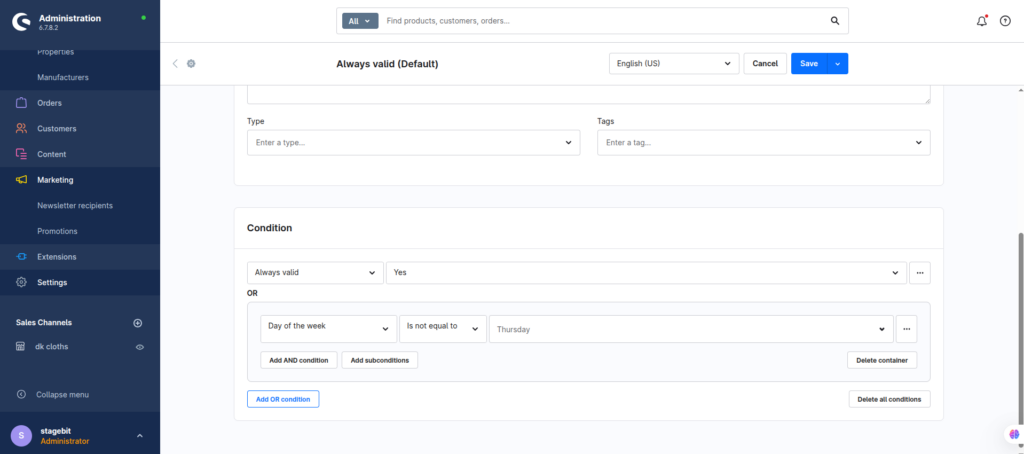
Once the base setup works, you can combine location rules with cart totals, product tags, shipping weights, or customer groups. This is where Shopware becomes very flexible. For example, you can allow invoice payments only for B2B customers in Germany above a certain order value, or offer free shipping only inside specific postal code ranges. Try to keep logic modular instead of building one giant rule with 20 conditions.
- Combine multiple conditions with AND/OR logic
- Create reusable rule groups
- Document complex logic for future admins
Test every checkout scenario
This is the step most teams rush through. Test with multiple countries, currencies, tax modes, and customer types before going live. A rule that works for logged-in B2B users might fail for guests, or a shipping method may disappear because another condition unexpectedly overrides it. We normally build a small matrix spreadsheet listing each country and expected payment/shipping result before launch.
- Create test customers in multiple regions
- Verify taxes, currencies, and checkout totals
- Review error logs if methods disappear unexpectedly
Shopware Shipping & Payment Rules Checklist
0 of 7 completeMistakes Most Developers Make
! One giant master rule
What happens: One condition change unexpectedly breaks multiple checkout flows.
Fix: Split rules into reusable regional and payment-specific blocks.
! No fallback payment method
What happens: Customers from unsupported regions cannot complete checkout.
Fix: Always keep one safe fallback payment option enabled.
! Ignoring guest checkout tests
What happens: Rules behave differently for anonymous users and cause hidden checkout failures.
Fix: Test all checkout flows with both guest and registered accounts.
Key Takeaway
The short version: Shopware handles location-based shipping and payment logic through Rule Builder and availability conditions attached to shipping and payment methods. The biggest problems usually come from overlapping conditions, missing fallback methods, or poor testing coverage. Build reusable regional rules first, keep payment and shipping logic separated, and test every checkout combination before launch. Start with Step 1—that one alone handles most of it.
Related Answers

Still need help?
Talk to our Shopware experts
We've handled GDPR/CCPA compliance for dozens of EU & US Shopware stores.