How to harden a Shopware 6 store against common attacks?
Quick Answer
Hardening a Shopware 6 store means reducing the attack surface before bots or attackers can exploit it. The biggest wins usually come from server-level security, admin protection, extension auditing, and regular patching. Most compromised stores are running outdated plugins, weak admin credentials, or exposed server services. The steps below cover the practical changes we apply during real Shopware deployments.
Before You Start
- ✦ Full server backup — some hardening changes affect sessions, permissions, and deployment workflows.
- ✦ Staging environment — test security rules before applying them to production traffic.
- ✦ SSH and server access — several protections happen outside the Shopware admin.
Keep Shopware updated
Most successful Shopware attacks happen on stores running old core versions or abandoned plugins. Security patches often fix publicly known vulnerabilities, which means bots actively scan for stores that missed updates. Treat Shopware updates as routine maintenance, not a once-a-year project. The same applies to PHP, MySQL, Redis, Elasticsearch, and server packages.
- Update Shopware core regularly
- Remove unsupported plugins immediately
- Keep PHP on a supported version
Lock down admin access
The Shopware admin panel is usually the primary target. Weak passwords, shared accounts, and unrestricted login URLs create easy entry points. Enable two-factor authentication for every admin user and restrict admin access by IP if your team works from fixed locations. Also remove inactive users and avoid giving full admin rights to agencies or marketers who only need content access.
- Enable 2FA for all admin accounts
- Use unique passwords and password managers
- Restrict admin URLs through firewall rules
Secure the server stack
Shopware security does not stop at the application layer. Poor server configuration causes just as many breaches as weak plugins. Disable unused ports and services, enforce SSH key authentication, and place Cloudflare or a WAF in front of the store. Production servers should never expose database ports publicly. File permissions also matter—your web server should only access what it actually needs.
- Disable password-based SSH logins
- Block unnecessary open ports
- Use a firewall and WAF protection
Audit installed extensions
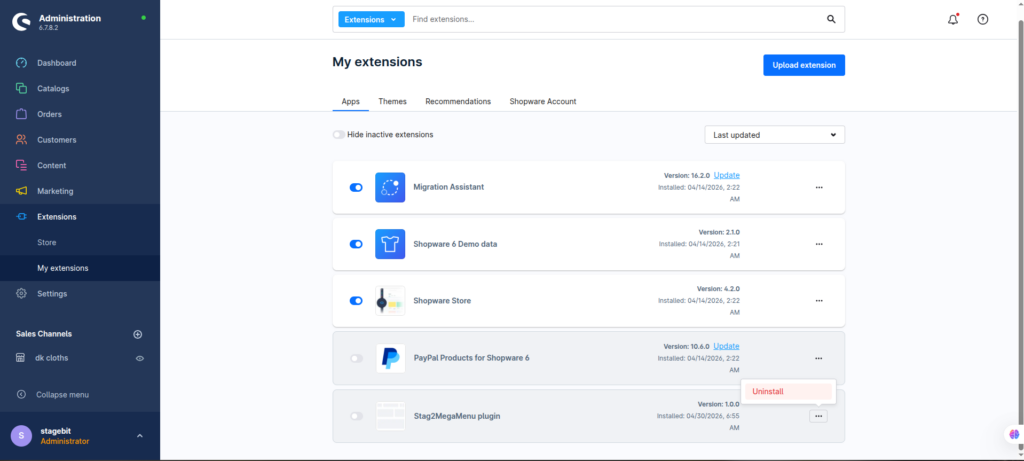
Every installed plugin increases your attack surface. We’ve seen stores running 70+ extensions where half were inactive, abandoned, or duplicated. Remove anything unused and avoid downloading plugins from unknown vendors. Review custom plugins carefully because insecure file uploads, API endpoints, and SQL queries are common problems in rushed builds.
- Delete inactive extensions completely
- Review plugin vendor reputation
- Audit custom code before deployment
Monitor and back up
Hardening is not a one-time task. You need visibility into failed logins, unusual admin actions, server load spikes, and file changes. Automated backups should run daily and be stored off-server. Test restore procedures regularly because many stores discover broken backups only after an incident.
- Enable server and application monitoring
- Store backups outside the production server
- Test backup restoration regularly
Key Takeaway
The short version: most Shopware 6 breaches come from outdated plugins, weak admin protection, or insecure server configuration. Start by keeping Shopware and all extensions updated, then lock down admin access with 2FA and firewall rules. After that, reduce unnecessary plugins and secure the underlying server stack. Monitoring and tested backups are your safety net when something still goes wrong. Start with Step 1—that one alone handles most of it.
Related Answers

Still need help?
Talk to our Shopware experts
We've handled GDPR/CCPA compliance for dozens of EU & US Shopware stores.