How to audit 3rd‑party apps and extensions for security?
Most Shopware security problems we see are not core-platform issues—they come from abandoned plugins, weak admin permissions, or extensions that quietly inject unsafe code into checkout, APIs, or customer accounts.
Developer reputation
Start with who built the extension. A well-known Shopware partner with active releases and public documentation is usually safer than a plugin from an unknown vendor with one support email and no changelog. Check how often updates are shipped, how quickly security issues get patched, and whether the vendor still supports current Shopware versions. Dead plugins become risky fast because they stop receiving compatibility and security fixes.
Requested permissions
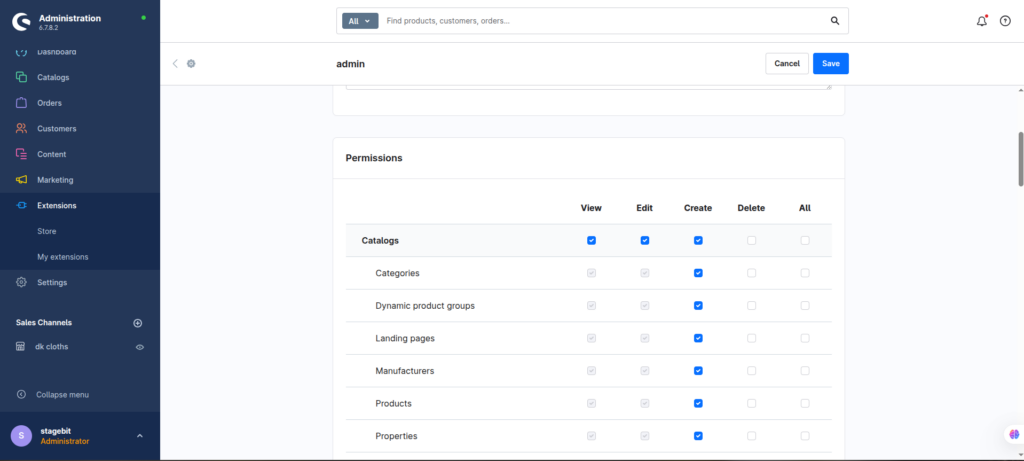
Look carefully at what the extension can access. Plugins touching orders, payments, customer accounts, admin APIs, or ERP credentials deserve far more scrutiny than a simple CMS block extension. If a marketing plugin suddenly requests full filesystem access or broad API scopes, treat that as a warning sign. Most stores never review extension permissions after installation—which is where trouble starts.
Code quality and obfuscation
Obfuscated PHP, encrypted loaders, or heavily minified admin scripts are usually a bad sign. Good Shopware extensions are readable and structured like normal Symfony or Shopware plugins. If your developers cannot reasonably inspect what the code does, you are effectively trusting a black box inside your production store. That becomes especially risky for checkout, login, or payment-related plugins.
External API dependencies
Many extensions connect to third-party APIs for tracking, feeds, search, or analytics. Audit exactly what customer or order data leaves your store and where it goes. We regularly find plugins sending unnecessary customer metadata to external services without merchants realising it. This matters even more for GDPR-sensitive stores handling EU customer data.
Update history and maintenance gaps
An extension that has not been updated in 12 to 18 months is risky even if it still technically works. Shopware evolves quickly, especially around Symfony dependencies and admin APIs. Old plugins often break silently after platform upgrades or leave outdated libraries exposed. Compatibility badges alone are not enough—check actual release frequency and changelog detail.
Composer dependency review
Extensions can pull in additional Composer packages that your team never intended to install. Review the plugin’s composer.json and scan for outdated libraries, abandoned packages, or duplicate framework components. Vulnerable Composer dependencies are one of the easiest ways attackers gain entry into older Shopware environments.
Admin user creation and roles
Some plugins quietly create admin users, scheduled tasks, API integrations, or elevated permissions during installation. Audit all new users and roles immediately after enabling an extension. We have seen cases where uninstalling the plugin removed the storefront feature but left privileged admin access active in the background.
Storefront JavaScript injections
Extensions that inject JavaScript into checkout, account pages, or tracking layers deserve extra attention. Poorly written frontend scripts can expose customer data, break Content Security Policy rules, or create XSS attack surfaces. Review browser console errors after installation and inspect what third-party scripts are loaded on live pages.
Server and infrastructure impact
Security is not only about malware. Bad extensions can overload queues, bypass cache layers, or generate uncontrolled API traffic that destabilises the store. Audit cron jobs, scheduled tasks, webhook retries, and queue workers after installation. A plugin that spikes CPU usage during peak traffic becomes an operational risk very quickly.
Testing outside production
Never install unknown plugins directly on the live store first. Use staging environments that mirror production integrations, payment flows, and caching layers. Many extension conflicts only appear under real-world traffic patterns or when multiple plugins modify the same checkout events. Testing in isolation catches most serious problems before customers see them.
Shopware Extension Security Audit Checklist
0 of 10 completeRelated Answers

Still need help?
Talk to our Shopware experts
We've handled GDPR/CCPA compliance for dozens of EU & US Shopware stores.