How to configure Shopware 6 for EU OSS/IOSS threshold rules?
Quick Answer
Shopware 6 can handle EU OSS and IOSS VAT rules, but you need to configure country-specific tax rules, sales channel tax settings, and shipping destinations correctly. Most stores get the tax rates right but miss threshold handling, B2B validation, or low-value import logic. Here’s the setup process we use on cross-border EU stores before launch.
Before You Start
- ✦ EU VAT registrations — You need active OSS or IOSS registrations before going live.
- ✦ Correct customer country data — Tax logic only works if delivery countries and addresses are reliable.
- ✦ A tax adviser familiar with OSS — Shopware handles calculations, but legal responsibility still sits with your business.
Create EU tax rates
Start by creating separate VAT rates for every EU country you sell into. OSS uses destination-based taxation, which means your French customer pays French VAT even if your business is registered elsewhere in the EU. Most stores only create one standard VAT rate and assume Shopware handles the rest automatically. It does not. You need explicit tax entities for Germany, France, Italy, Spain, and every other applicable market.
- Create one tax entry per EU country
- Match the official standard VAT rate
- Name taxes clearly by country code
Assign country tax rules
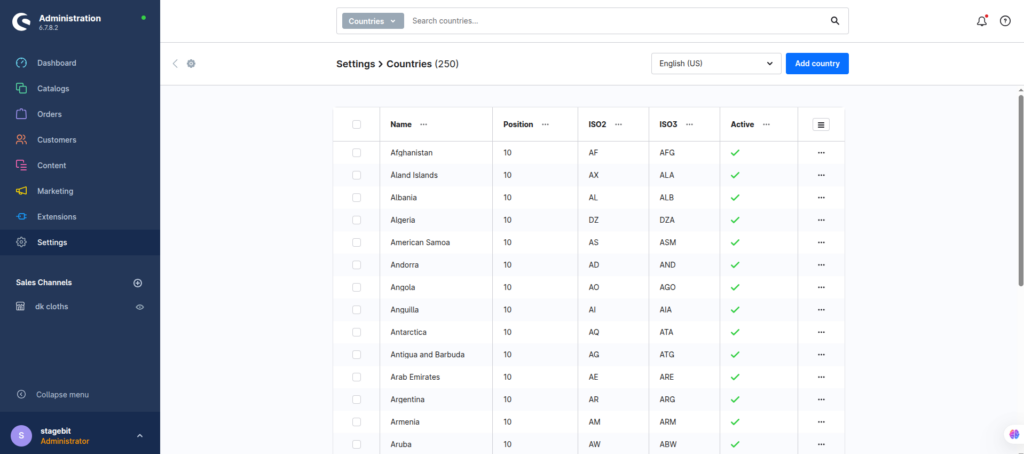
Each country needs the correct default tax linked to it. This tells Shopware which VAT rate applies when a customer ships to that destination. For OSS compliance, the shipping country usually decides the tax rate. This is where many migration projects fail because imported countries still point to a legacy default tax from Magento or another platform.
- Open each EU country individually
- Set the correct VAT rule as default
- Verify gross pricing displays correctly
Configure OSS thresholds
The EU-wide OSS threshold for distance sales is currently €10,000 across all participating member states combined. Below that threshold, some businesses still apply domestic VAT. Above it, destination VAT applies. Shopware does not automatically monitor or enforce this threshold for you. Most merchants handle this operationally by enabling destination VAT from day one instead of switching later.
- Decide whether to apply OSS immediately
- Track EU cross-border turnover externally
- Align ERP and accounting logic with Shopware
Handle IOSS imports
IOSS mainly applies to low-value imported goods under €150 shipped into the EU from outside the union. If your fulfilment centre is outside the EU, your checkout needs to collect VAT upfront instead of leaving charges to customs. Shopware can calculate these taxes, but your shipping setup and customs workflow must also support IOSS references and reporting.
- Separate EU and non-EU fulfilment flows
- Verify shipping plugins support IOSS references
- Test checkout totals for imported orders
Configure B2B VAT validation
If you sell to VAT-registered EU businesses, you’ll usually need reverse-charge handling and VAT ID validation. Native Shopware support is limited here, so many stores add a VIES validation plugin or external ERP validation logic. The key is making sure valid B2B customers do not get consumer VAT rates at checkout.
- Add VAT ID fields during registration
- Validate IDs against VIES services
- Create separate customer tax rules if needed
Test cross-border checkout
Before launch, place test orders using multiple EU destinations, customer groups, and shipping methods. Do not trust admin previews alone. Real checkout testing catches rounding issues, shipping tax mismatches, and cached pricing problems. We normally run at least one order scenario per major market before approving go-live.
- Test Germany, France, Spain, and Italy orders
- Compare checkout totals against accounting rules
- Verify invoice VAT display formatting
Shopware OSS/IOSS Checklist
0 of 8 completeMistakes Most Developers Make
! Using one VAT rate everywhere
What happens: Customers in different EU countries get incorrect VAT totals.
Fix: Create country-specific tax rules and map them properly inside country settings.
! Ignoring B2B reverse-charge rules
What happens: VAT gets charged to businesses that should qualify for reverse-charge invoicing.
Fix: Validate VAT IDs through VIES before changing customer tax treatment.
! Forgetting shipping tax behaviour
What happens: Product taxes calculate correctly but shipping totals remain wrong.
Fix: Test every shipping method separately across multiple destination countries.
! Trusting sandbox tests only
What happens: Real checkout sessions expose VAT rounding and cache issues after launch.
Fix: Run live-style checkout tests using multiple countries and customer types before go-live.
Key Takeaway
The short version: Shopware 6 can support EU OSS and IOSS rules well, but only if your tax structure, country mappings, and checkout testing are configured properly. The biggest problems usually come from missing country tax assignments, invalid B2B handling, and untested shipping taxes. You should also decide early whether to apply destination VAT immediately or manage the €10,000 threshold operationally. Start with Step 1—that one alone handles most of it.
Related Answers

Still need help?
Talk to our Shopware experts
We've handled GDPR/CCPA compliance for dozens of EU & US Shopware stores.