How to connect Shopware 6 to Akeneo PIM or Plytix?
Quick Answer
You can connect Shopware 6 to both Akeneo PIM and Plytix using API-based connectors or middleware platforms like Make, n8n, or custom integration services. The setup usually includes product mapping, media sync, category structure alignment, and scheduled imports into Shopware. The biggest issues happen around variant handling and attribute mapping—so getting your data model right before syncing matters more than the connector itself.
Before You Start
- ✦ Working Shopware 6 API access — your integration cannot push products without Admin API credentials.
- ✦ Defined product attribute structure — changing attributes after import usually breaks variant relationships.
- ✦ A staging Shopware environment — never test first-time PIM imports directly on production.
Prepare your data model
Before connecting anything, clean up your Shopware product structure. This includes properties, variant groups, categories, manufacturer names, and media rules. Akeneo and Plytix both work best when Shopware already has a predictable structure. Most failed integrations come from inconsistent attributes like “Color”, “Colour”, and “color_name” all existing separately (this happens more often than people admit).
- Standardize product attributes before syncing
- Create variant groups for size, color, or material
- Remove duplicate properties from Shopware
Create API credentials
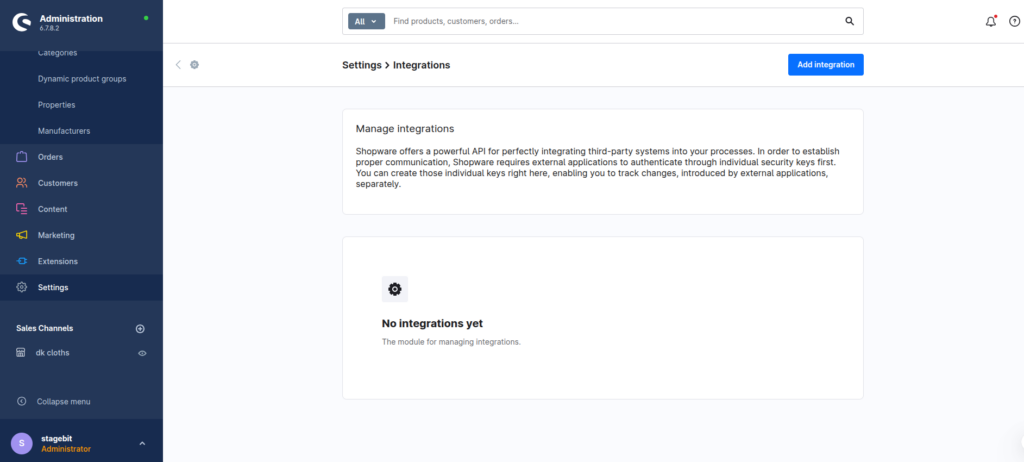
Shopware integrations use API credentials generated from the Integrations section. Create a dedicated API integration for Akeneo or Plytix instead of reusing an admin account. This makes debugging easier and reduces permission issues later. For Akeneo, you’ll usually need both read and write permissions. Plytix setups are often simpler because many stores only push catalog data one way into Shopware.
- Create a dedicated API integration user
- Store the access key securely outside Shopware
- Limit permissions to product-related resources
Connect the PIM platform
You now need the actual connector layer between Shopware and the PIM. Some businesses use ready-made plugins. Others use middleware like Make or custom Symfony services for more control. Akeneo projects usually need deeper configuration because enterprise catalogs often contain multilingual attributes, family structures, and enrichment workflows. Plytix integrations are normally faster for smaller catalogs with simpler product logic.
- Connect Shopware API credentials inside the PIM
- Choose push sync, pull sync, or scheduled jobs
- Test connection authentication before importing data
Map products and attributes
Attribute mapping is where most of the real integration work happens. You need to decide how PIM fields translate into Shopware properties, custom fields, SEO URLs, categories, and variant options. This is also where you define image handling and localization rules. If your PIM uses a different variant structure than Shopware, solve that mismatch here before imports begin.
- Map SKUs consistently between systems
- Assign translated content to Shopware sales channels
- Configure media import paths and naming rules
Run test imports
Start with a controlled import into staging. Check variants, category assignments, translated fields, media imports, and storefront filters. Then test product updates instead of just first-time imports. Many integrations work fine initially but fail when products change later because update rules were never validated properly.
- Import a small product batch first
- Verify variant URLs and SEO fields
- Test product updates and deletions separately
Schedule automated syncs
Once the test imports are stable, automate the synchronization process. Most stores run scheduled syncs every 15 minutes to one hour depending on catalog size. Enterprise catalogs sometimes separate product, inventory, and media jobs to reduce server load. Add logging and notifications from day one—otherwise you usually discover failed imports weeks later.
- Configure cron jobs or scheduled sync tasks
- Enable integration logging and alerts
- Monitor API rate limits during large imports
Shopware PIM Integration Checklist
0 of 8 completeMistakes Most Developers Make
! Importing without variant planning
What happens: Variant products split into separate standalone items in Shopware.
Fix: Finalize variant groups and parent-child relationships before the first sync.
! Mixing manual and synced edits
What happens: Product content gets overwritten every time the sync job runs.
Fix: Decide clearly whether Shopware or the PIM is the master data source.
! Ignoring media import limits
What happens: Large image imports time out and leave incomplete product galleries.
Fix: Process media imports in smaller queues or separate scheduled jobs.
Key Takeaway
The short version: connecting Shopware 6 to Akeneo or Plytix is mostly a data structure project, not just a plugin install. The connector itself is usually the easy part. The real work is aligning attributes, variants, translations, media handling, and update logic so your catalog stays clean over time. Test imports in staging first, decide which system owns the product data, and monitor sync jobs from the beginning. Start with Step 1—that one alone handles most of it.
Related Answers

Still need help?
Talk to our Shopware experts
We've handled GDPR/CCPA compliance for dozens of EU & US Shopware stores.