How to A/B test flows and measure impact on conversion?
Quick Answer
You can A/B test Shopware flows by creating controlled flow variants, splitting traffic or customer segments between them, and tracking a single conversion goal for each test. Most stores measure impact using metrics like checkout completion, repeat purchases, email click-through rate, or average order value. The key is keeping the test isolated—changing multiple automations at once makes the data unreliable.
Before You Start
- ✦ Flow Builder access — you need permission to create and edit automation flows in Shopware Admin.
- ✦ Analytics tracking — GA4, Matomo, or a BI tool is needed to measure actual conversion impact.
- ✦ Enough traffic volume — low-volume stores usually get misleading results from short tests.
Define one conversion goal
Start with one measurable outcome. That could be abandoned cart recovery rate, post-purchase upsell revenue, repeat order rate, or email click-through rate. Most failed A/B tests happen because stores try to improve five metrics at once. Pick the metric that directly affects revenue first. Then lock it for the entire test period.
- Choose one primary KPI
- Define a target percentage increase
- Track supporting metrics separately
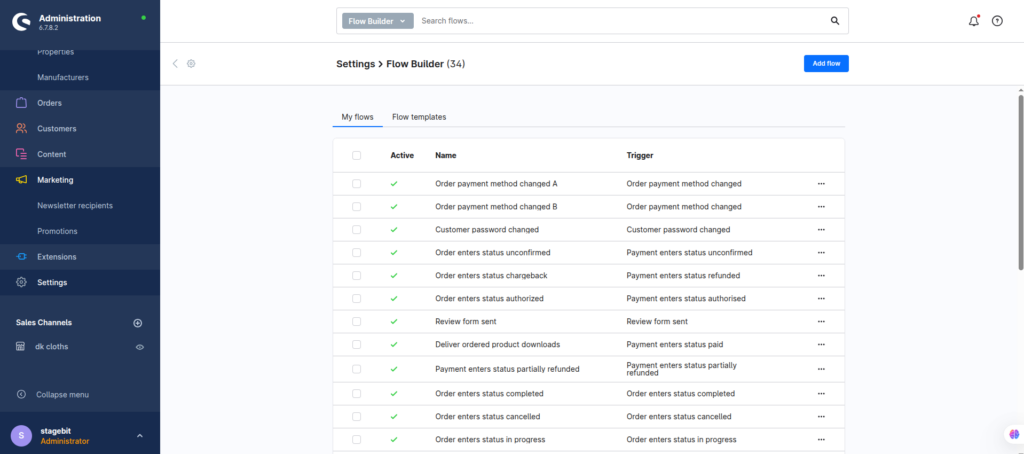
Create two flow variants
Duplicate your existing flow and modify only one variable. That might be email timing, discount percentage, SMS vs email delivery, or the trigger condition itself. Keep everything else identical. If you change multiple variables together, you won’t know what actually improved conversion.
- Duplicate the original flow
- Change one variable only
- Name versions clearly like Variant A and B
Split customer traffic
Shopware doesn’t include native enterprise-grade experimentation logic out of the box, so most teams split audiences using customer tags, rule builder conditions, or external CDP tools. The goal is giving each customer exposure to only one variant. Cross-contamination ruins the data fast.
- Create audience conditions with Rule Builder
- Assign users consistently to one branch
- Keep traffic allocation balanced
Track conversion events
Connect your flows to measurable events inside GA4, Meta, Klaviyo, or your reporting stack. UTM tagging is still one of the simplest ways to isolate performance. If you’re testing post-purchase flows, track downstream revenue for at least seven to 14 days after the trigger.
- Add unique UTM parameters per variant
- Track assisted conversions
- Measure revenue, not just clicks
Evaluate statistical impact
Let the test run long enough to produce meaningful data. For most mid-sized stores, that means at least one full business cycle. Weekend-heavy stores should test across multiple weekends. Small differences under five percent are often noise unless you have large traffic volumes.
- Wait for enough conversions before deciding
- Compare conversion lift against baseline
- Archive losing variants for future reference
Shopware Flow Testing Checklist
0 of 6 completeMistakes Most Developers Make
! Testing too many variables
What happens: You can’t identify which change actually improved conversion.
Fix: Change one variable at a time and keep the rest identical.
! Ending tests too early
What happens: Short-term spikes get mistaken for real conversion improvements.
Fix: Run tests across complete business cycles before making decisions.
! Measuring clicks instead of revenue
What happens: A flow may look successful while reducing actual profitability.
Fix: Tie every experiment back to revenue or completed checkout data.
Key Takeaway
The short version: successful Shopware flow testing comes down to isolating one variable, splitting audiences correctly, and measuring real business impact instead of vanity metrics. Most stores break their data by changing too many things at once or stopping tests too early. Keep your tracking clean, use consistent audience rules, and let the experiment run long enough to become meaningful. Start with Step 1—that one alone handles most of it.
Related Answers

Still need help?
Talk to our Shopware experts
We've handled GDPR/CCPA compliance for dozens of EU & US Shopware stores.