How to combine Rule Builder with CMS blocks for personalized content?
Quick Answer
You can combine Shopware Rule Builder with CMS blocks by assigning visibility conditions to shopping experiences, CMS sections, dynamic product groups, and promotions tied to customer context. The result is personalized storefront content that changes based on customer group, cart value, language, country, device, login state, or custom rules. Most stores get this wrong by building separate landing pages instead of using conditional CMS rendering. Here’s how to structure it properly in Shopware 6.
Before You Start
- ✦ Shopware Rule Builder access — you need admin permissions to create and assign custom rules.
- ✦ Shopping Experiences configured — CMS pages and layouts must already exist before you can personalize them.
- ✦ Clear segmentation strategy — decide upfront whether you’re targeting B2B users, first-time buyers, VIP customers, or regional audiences.
Define customer segments
Start with the actual business logic before touching CMS layouts. Most personalization projects fail because stores create rules around technical conditions instead of customer intent. Think in terms of outcomes. For example: wholesale buyers should see bulk-order banners, logged-out users should see newsletter incentives, and customers from Germany should see different shipping messaging than UK buyers. Build reusable rules instead of one-off conditions tied to a single CMS page.
- Create rules based on customer groups or cart state
- Name rules clearly with business meaning
- Group related conditions into reusable logic sets
Build targeted CMS content
Create CMS blocks that match the audience segments from Step one. Keep the structure modular. One banner block for VIP customers. Another for first-time visitors. Another for B2B accounts. Avoid duplicating entire CMS pages unless the layout itself changes heavily. In most cases, swapping sections or blocks conditionally is cleaner and easier to maintain long-term.
- Create separate CMS blocks for each audience type
- Use dynamic product groups where possible
- Keep shared layout components reusable
Assign rules to visibility
This is where personalization actually happens. Depending on your Shopware version and plugins, you can attach Rule Builder conditions to CMS visibility, category assignments, dynamic product streams, or custom CMS elements. Many stores use extensions that expose Rule Builder conditions directly inside Shopping Experiences. The goal is simple: show the right content only when rule conditions match.
- Assign customer-based visibility conditions
- Connect rules to banners or CMS sections
- Test fallback content for unmatched visitors
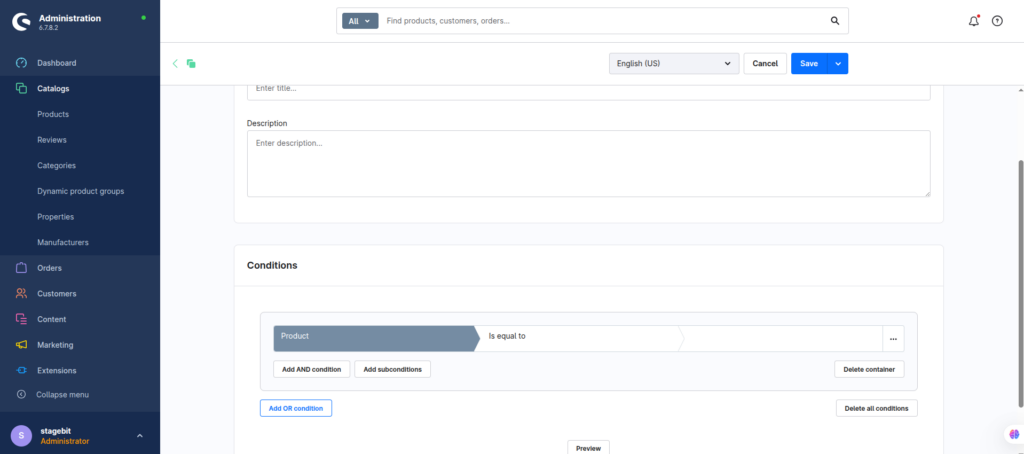
Connect dynamic product streams
Personalized content works best when products change alongside messaging. Dynamic product groups let you display different assortments based on conditions like margin, stock, manufacturer, season, or custom fields. Combined with Rule Builder, you can create region-specific bestsellers, B2B-only assortments, or high-margin upsell sections without manually editing CMS pages every week.
- Create product streams using filters and conditions
- Insert streams into CMS product sliders
- Use custom fields for advanced merchandising logic
Test every customer scenario
Rule collisions happen more often than most teams expect. A logged-in VIP customer from France using a mobile device might trigger four separate rules at once. Test combinations instead of isolated conditions. Also test cache behavior carefully. Full-page caching and CDN layers can accidentally serve personalized content to the wrong visitor if cache contexts are not configured properly.
- Create test accounts for every customer group
- Check storefront caching behavior carefully
- Validate mobile and desktop rendering separately
Shopware Personalization Checklist
0 of 8 completeMistakes Most Developers Make
! Building too many rules
What happens: Admin management becomes chaotic and conflicting conditions start overriding each other.
Fix: Consolidate similar logic into reusable rule groups instead of creating dozens of single-purpose rules.
! Ignoring cache variations
What happens: Customers see banners, pricing, or product blocks intended for another segment.
Fix: Configure cache contexts correctly and test with multiple customer sessions before launch.
! Duplicating complete CMS pages
What happens: Content updates become slow because every campaign change must be repeated across multiple layouts.
Fix: Personalize sections and blocks instead of cloning entire storefront experiences.
! Forgetting fallback content
What happens: New visitors or unmatched customers end up with blank content areas.
Fix: Always include a default CMS experience that displays when no personalization rules apply.
Key Takeaway
The short version: combine Rule Builder with modular CMS blocks instead of building separate storefronts for every audience type. Create reusable business rules first, then connect them to CMS visibility, product streams, and personalized messaging. The biggest problems usually come from rule sprawl, duplicated layouts, and cache leakage between customer sessions. Keep the setup modular and test every customer scenario before launch. Start with Step 1—that one alone handles most of it.
Related Answers

Still need help?
Talk to our Shopware experts
We've handled GDPR/CCPA compliance for dozens of EU & US Shopware stores.