How do I import and export products using CSV in Shopify?
Shopify allows you to import and export products in bulk using CSV (comma-separated values) files. This is especially useful for large inventories, migrating stores, or updating product details efficiently.
1. Understanding CSV Files in Shopify
A CSV file is a text file where each line represents a product (or variant), and columns represent product details such as Title, SKU, Price, Inventory, Images, and more.
- Importing CSV: Upload products into Shopify from a CSV.
- Exporting CSV: Download products from Shopify to edit or backup.
- Benefits: Manage large inventories, synchronize with other platforms, bulk-update products.
2. Download a Sample CSV File
- Go to Products > All Products > Import and click Download a sample CSV.
- The sample contains two example products with variants. Remove these before use.
- Note: Inventory column is for single-location stores. Use inventory CSV for multiple locations. International pricing columns are optional.
3. Required Columns and Formatting
- First line must contain column headers.
- Columns must be separated by commas.
- Use UTF-8 encoding with LF linefeeds.
Required Columns:
- New products: Title (and URL handle if adding variants)
- Updates: Title and URL handle
Data dependencies: Columns like SKU or Weight require Option1 name/value for variants.
Caution: Changing Option1/2/3 values recreates variant IDs and may break integrations.
4. Important Columns in a Product CSV
| Column | Description |
|---|---|
| Title | Product name displayed to customers |
| URL handle | Unique product URL identifier |
| Description | Product details |
| Vendor | Product source or manufacturer |
| Product category / Type | Taxonomy and organization |
| Tags | Keywords for search and filtering |
| Published on online store | true/false to show product |
| Status | active / draft / archived |
| SKU | Variant stock keeping unit |
| Barcode | UPC, ISBN, or other codes |
| Options (Option1/2/3) | Variants like size, color, etc. |
| Price / Compare-at price | Product pricing |
| Inventory tracker / Inventory quantity | Stock tracking |
| Continue selling when out of stock | deny / continue |
| Weight value / Weight unit | Shipping calculation |
| Requires shipping | true / false |
| Fulfillment service | manual or custom service |
| Images | Product media for storefront |
| SEO title / SEO description | Optional SEO optimization |
| Google Shopping / International | Optional market-specific data |
| Metafields | product.metafields.namespace.key format |
| Collection | Optional column to assign collections |
5. Preparing Images for CSV
- Images must be hosted on a public URL.
- Shopify supports up to 250 images per product.
- Recommended: Upload images to Shopify Files or public hosting.
- CSV does not support videos or 3D models.
6. Adding Multiple Images to a Product
- Insert a new row for each image.
- Copy the product handle in column A.
- Paste the image URL in Product image URL.
- Add alt text if needed.
- Use Image position to order images.
7. Importing Products via CSV
- Shopify Admin > Products > Import
- Add your CSV file
- Choose overwrite option if updating
- Upload and confirm


Notes: Blank columns overwrite data; missing columns may delete variants.
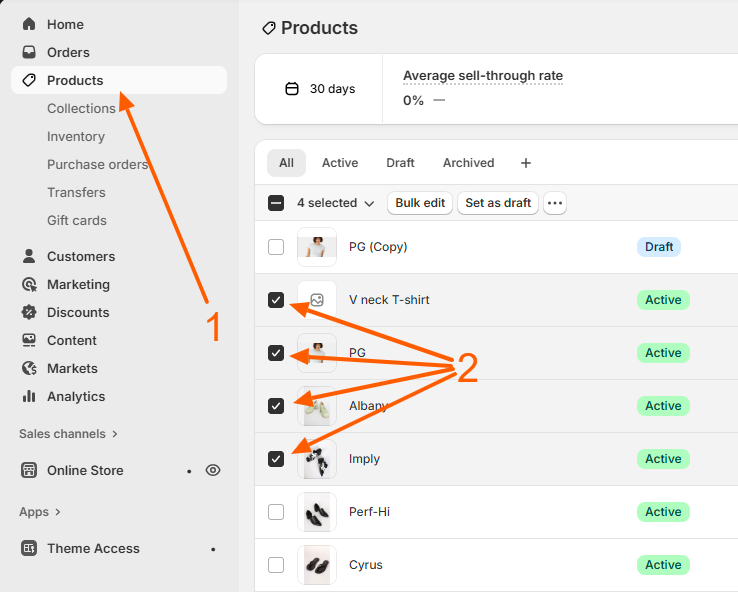
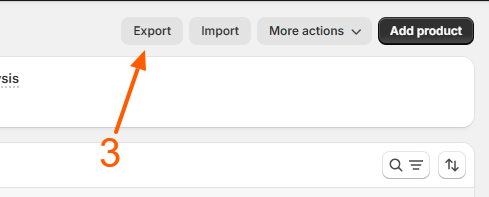
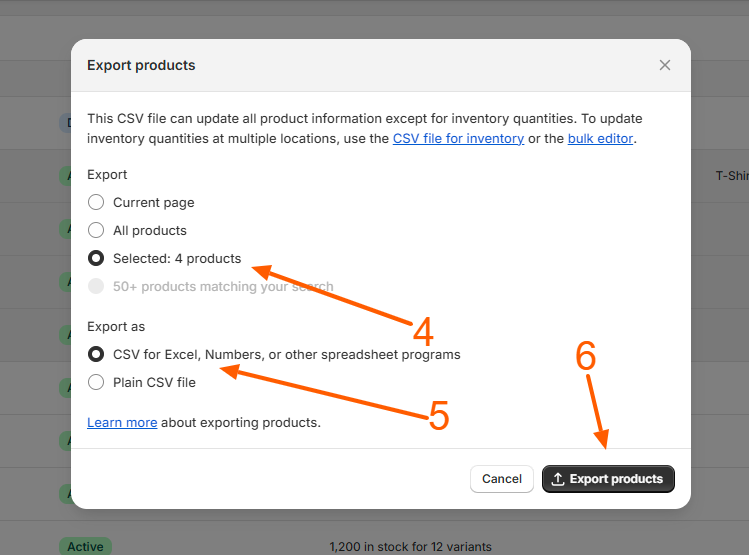
8. Exporting Products via CSV
- Shopify Admin > Products > Export
- Select products
- Choose CSV format
- Click Export
9. Managing International and Metafields Data
- Use International pricing columns
- Metafields format: product.metafields.namespace.key
10. Best Practices and Cautions
- Always backup before importing
- Test with small imports
- Ensure all URLs work
- Do not remove dependent columns
✅ Result: Bulk CSV import/export lets you manage thousands of products faster, safer, and with better SEO control.
Related Answers

Still need help?
Talk to our Shopify experts
We've handled GDPR/CCPA compliance for dozens of EU & US Shopify stores.