How do I customize the Shopify checkout page design and branding?
Your Shopify checkout is where customers complete their purchase. Shopify allows you to brand this page with your logo, colors, fonts, and layout so your checkout looks professional and matches your store — without using any code.
Who Can Customize Checkout?
→ All Shopify stores can customize checkout branding (logo, colors, fonts, layout style). → Shopify Plus stores get full checkout layout control, custom fields, upsells, and advanced flow customization.
Step 1 – Open Checkout Branding
→ Go to Settings → Checkout
→ Find Checkout branding
→ Click Customize
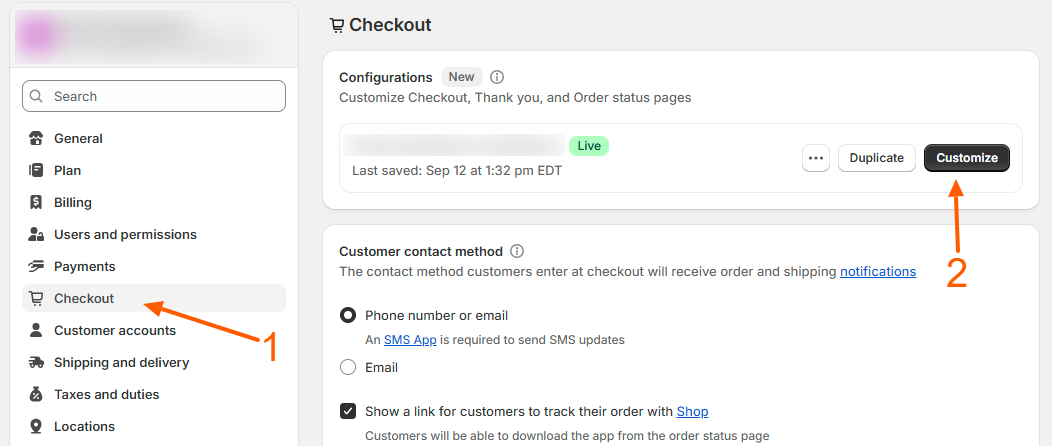
Step 2 – Add Your Logo
→ Upload your store logo → Choose logo alignment: Left, Center, or Right → Select logo position (Full width or Standard)
Step 3 – Add Header Background Image
→ Upload a background image for the checkout header → This creates a branded top section behind your logo
Step 4 – Set Checkout Background Colors
→ Background 1 controls the checkout form area → Background 2 controls the order summary and customer account pages → You can use images or colors for both
Step 5 – Set Brand Colors
→ Accent color controls links and highlights → Buttons color controls the “Pay now” and continue buttons → Error color controls warning and validation messages → Fields & cards controls the form input background style
Step 6 – Choose Fonts
→ Select heading font → Select body font → This controls all text inside your checkout
Step 7 – Choose Checkout Layout
→ Select One-page layout for faster checkout → This keeps everything on one clean screen
Step 8 – Enable Smart Checkout Features
→ Turn on Address autocompletion to help customers fill faster → Enable Buy again button so repeat customers can reorder quickly
Step 9 – Preview & Save
→ Use preview to check mobile and desktop view → Click Save to make your branded checkout live instantly
What You Can Change (Regular Shopify)
You can brand your checkout design, colors, fonts, backgrounds, logo, and enable faster checkout tools. You cannot change checkout steps, add custom fields, or modify checkout flow unless you are on Shopify Plus.
What Extra You Get on Shopify Plus
Shopify Plus unlocks full checkout control, including:
- Add custom checkout fields (VAT, GST, Company name, Delivery instructions)
- Rearrange checkout steps and layout
- Add upsells, gift messages, and order notes
- Customize thank-you and order status pages
- Insert trust badges, banners, and custom content blocks
- Build advanced checkout experiences using Checkout Extensibility
Pro Tip
Even without Plus, a clean logo, bright button color, and one-page checkout layout can significantly increase completed purchases.
Excerpt
You can customize your Shopify checkout with logo, colors, fonts, background images, and one-page layout. Shopify Plus users can further add custom fields, upsells, and full checkout layout control to build advanced high-converting checkout experiences.
Related Answers

Still need help?
Talk to our Shopify experts
We've handled GDPR/CCPA compliance for dozens of EU & US Shopify stores.