How do I handle abandoned carts in Shopify and send recovery emails?
An abandoned cart happens when a customer starts the checkout process, enters their email or phone number, and then leaves your store without completing payment. These are highly valuable visitors because they already showed buying intent — they just need a small reminder to come back and finish their order.
Why abandoned carts are important
More than 60% of online shoppers leave before completing checkout. Recovering even a small percentage of these customers can significantly increase your sales without spending money on ads. Shopify allows you to automatically send reminder emails to bring these customers back.
Step 1 – Enable abandoned checkout recovery emails
Go to Settings → Checkout
Scroll to the Abandoned checkout emails section
Turn on Send abandoned checkout emails automatically
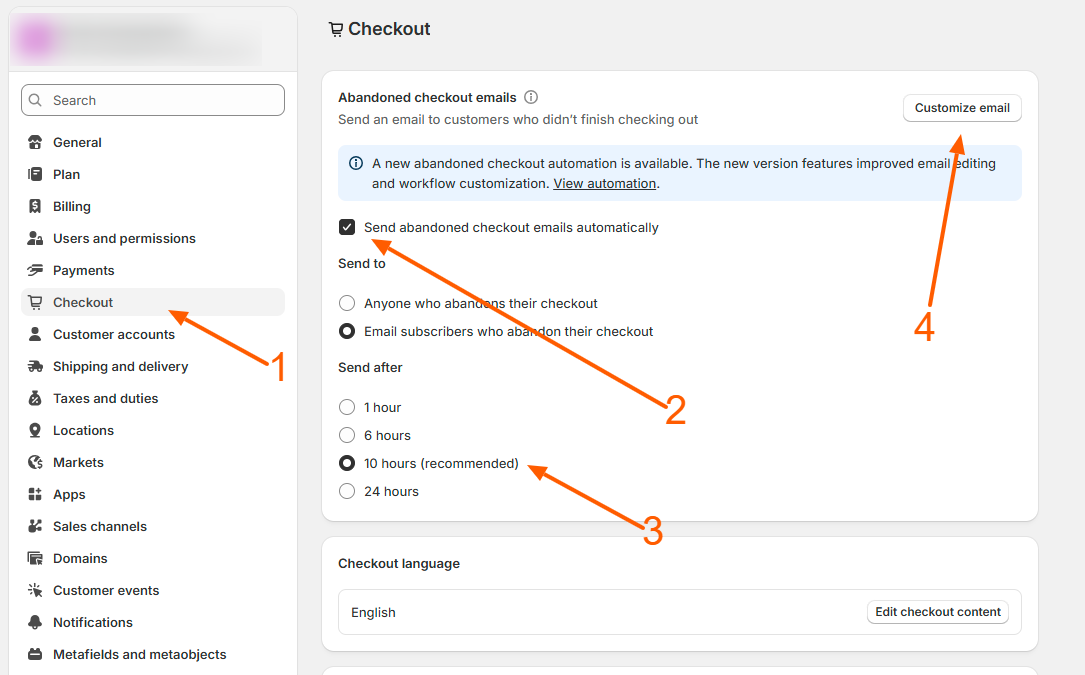
Step 2 – Choose when the email should be sent
Select the time Shopify should wait before sending the recovery email:
→ 1 hour
→ 6 hours
→ 10 hours (recommended)
→ 24 hours
Step 3 – Choose who should receive recovery emails
You can send reminder emails to:
→ Anyone who abandons checkout
→ Only customers who accepted marketing emails
Step 4 – Customize your recovery email design
Go to Settings → Notifications
Open Abandoned checkout
Click Edit
Here you can update your logo, colors, subject line, button text, and message.
Step 5 – Test your abandoned checkout emails
→ Add a product to your cart
→ Go to checkout
→ Enter your email address
→ Close the page without paying
→ Wait for your selected time and check your inbox
Step 6 – Track recovered orders
Go to Orders → Abandoned checkouts
Here you can see who abandoned checkout, which emails were sent, and which orders were recovered.
Important note
Shopify sends abandoned checkout emails only when a customer enters their email or phone number at checkout. Customers who leave before checkout (cart-only visitors) are not captured by Shopify’s default recovery system.
Recover cart-only visitors (optional)
To recover visitors who leave from the cart page, you can use marketing apps like Klaviyo, Omnisend, Avada, SMSBump, PushOwl, or Privy.
Benefits of abandoned cart recovery
→ Automatically recovers lost sales
→ Works on all Shopify plans
→ No coding required
→ Increases conversion rates by 10%–30%
Related Answers

Still need help?
Talk to our Shopify experts
We've handled GDPR/CCPA compliance for dozens of EU & US Shopify stores.