Running multiple Shopify stores under one email or organisation is a smart way to scale into new countries, brands or customer segments – as long as you set it up correctly and keep operations under control.
In this guide, you’ll learn how to set up and manage multiple Shopify stores, when it makes sense, what to watch out for, and answers to the most common questions merchants ask.
Can you run multiple Shopify stores with one account?
Shopify technically treats each store as its own account, but you can create and manage multiple Shopify stores with the same email address. Each store has its own admin, subscription, apps, and billing.
Once you’ve logged into your Shopify admin, you can switch between your Shopify stores that are linked to the same email address using the store switcher in the admin.
If you’re on Shopify Plus, you also get access to additional expansion stores under the same Shopify organisation, which is helpful for:
- Running different storefronts for multiple countries or regions
- Separating B2B and B2C stores
- Managing multiple brands from a single enterprise setup
If you’re using Basic Shopify, Shopify, or Advanced Shopify, you can still run multiple Shopify stores – you’ll just create separate stores and connect them to the same email, with separate subscriptions.
Do you really need multiple Shopify stores?
Before you launch a second (or third) Shopify store, it’s worth checking if you truly need a multi-store setup or if a single, well-structured store is enough.
You probably do not need multiple Shopify stores if:
- You are selling under one brand in one main language and currency
- Your target audience is similar across all regions
- You can handle everything with one catalog, one pricing structure, and one checkout funnel
You should consider multiple stores when:
- You have clearly different brands, price points, or product lines that shouldn’t mix
- You are expanding into countries that require very different content, pricing, or tax setups
- You want totally different UX, merchandising, and marketing strategies for different audiences
In short: start with one strong, high-performing Shopify store. Move to a multi-store architecture when it becomes the bottleneck for your growth, not before.
Reasons for building multiple Shopify stores
Whether you need multiple stores depends on your business model and growth plans. Managing more than one store means more work – but it can also unlock more revenue if done strategically.
You might consider multiple Shopify stores when:
- Expanding internationally – separate storefronts for different countries, languages, or currencies
- Serving different business models – one store for B2C, another for B2B/wholesale, marketplaces, or partners
- Operating multiple brands – each brand gets its own store, product catalog, and positioning
- Segmenting product ranges – splitting complex or very large catalogs into focused niche stores
- Running regional marketing – country-specific promotions, SEO, and localized content by store
The key is to balance growth with complexity: only add another Shopify store when you have a clear goal and the capacity to manage it.
How to set up & manage multiple stores on Shopify
The core principle is simple: you’ll create separate Shopify stores (or expansion stores on Shopify Plus) and then connect them with consistent branding, inventory rules, and processes.
Step 1: Create another Shopify store
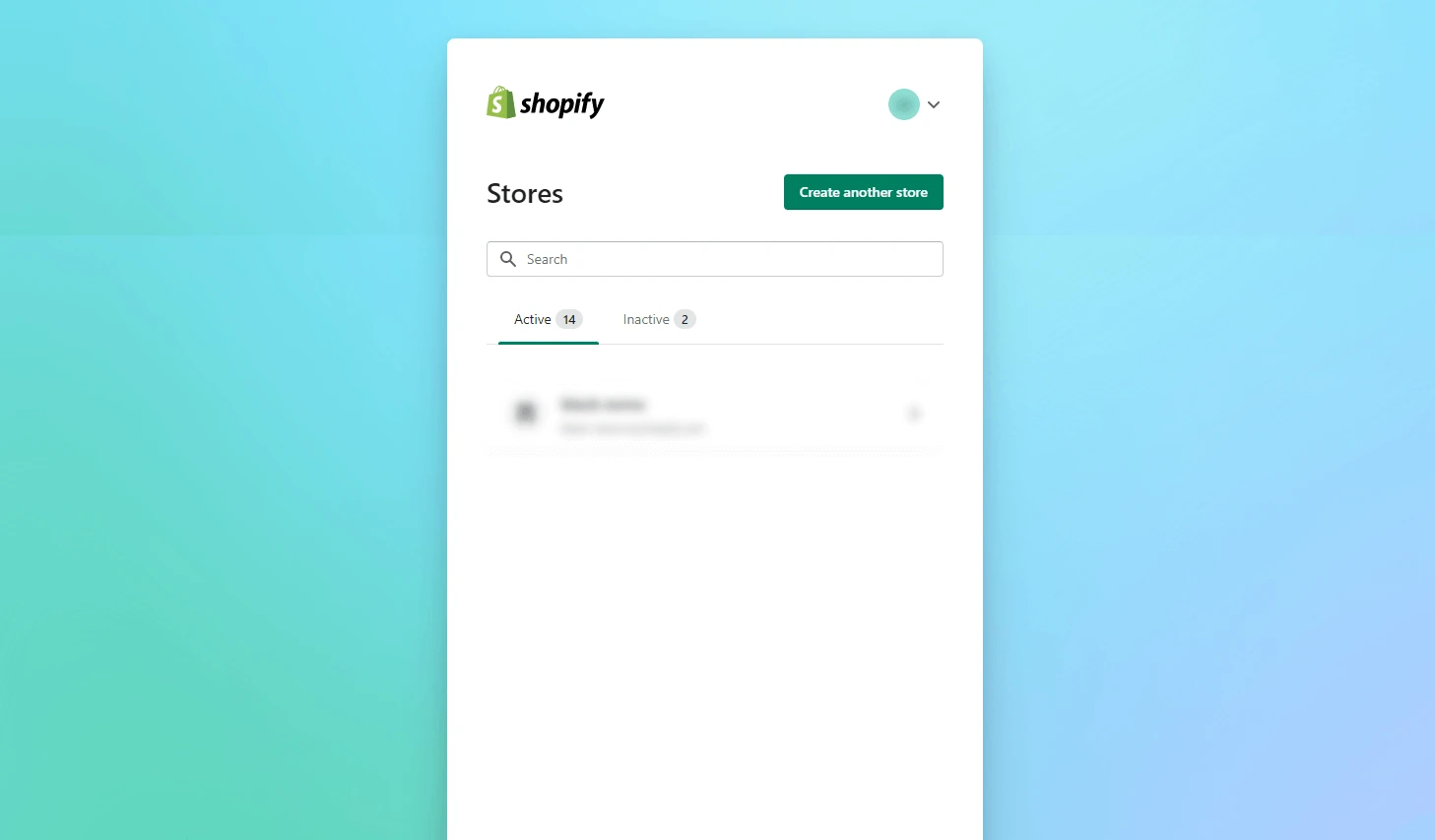
From your Shopify login screen, you’ll see a list of all stores associated with your email. From there you can create a new store:
- Go to the Shopify login page and sign in with your email.
- Use the store switcher dropdown.
- Click on the option to create a new store.
Each store you create will have its own billing, theme, apps, and configuration. If you’re on Shopify Plus, you can set up expansion stores under the same organisation to simplify multi-store management.
Step 2: Add and structure products for each store
Once your new Shopify store is created, start by configuring your product catalog:
- Decide which products will be unique to this store and which will be shared across stores.
- Set up clear collections so products are easy to discover.
- Use consistent product data structures (titles, SKUs, options, tags) across all stores to avoid chaos later.
For SEO and GEO, make sure each product and collection page includes:
- Localized titles and meta descriptions
- Country- or region-specific keywords and offers
- Clean URLs, sitemaps, and properly configured
robots.txt
If you are targeting a specific region (for example, North America or DACH), optimize your store content, tax settings, and shipping rules specifically for that market.
Step 3: Set up real-time inventory updates
If the same products are sold across multiple stores, real-time inventory sync is essential. Without it you risk:
- Overselling the same item across stores
- Stockouts that hurt conversion and customer trust
- Confusing operations and difficult reporting
Use inventory management tools or apps (for example, apps like Stock Sync) or API-based integrations to:
- Update stock levels across all stores automatically
- Get low-stock alerts before you run out
- Keep warehouse inventory and Shopify in sync
By ensuring that you always have adequate stock, a real-time inventory management setup can greatly improve your customers’ shopping experience.
Step 4: Localise language and store settings
For international stores, language and localization are critical parts of your multi-store strategy.
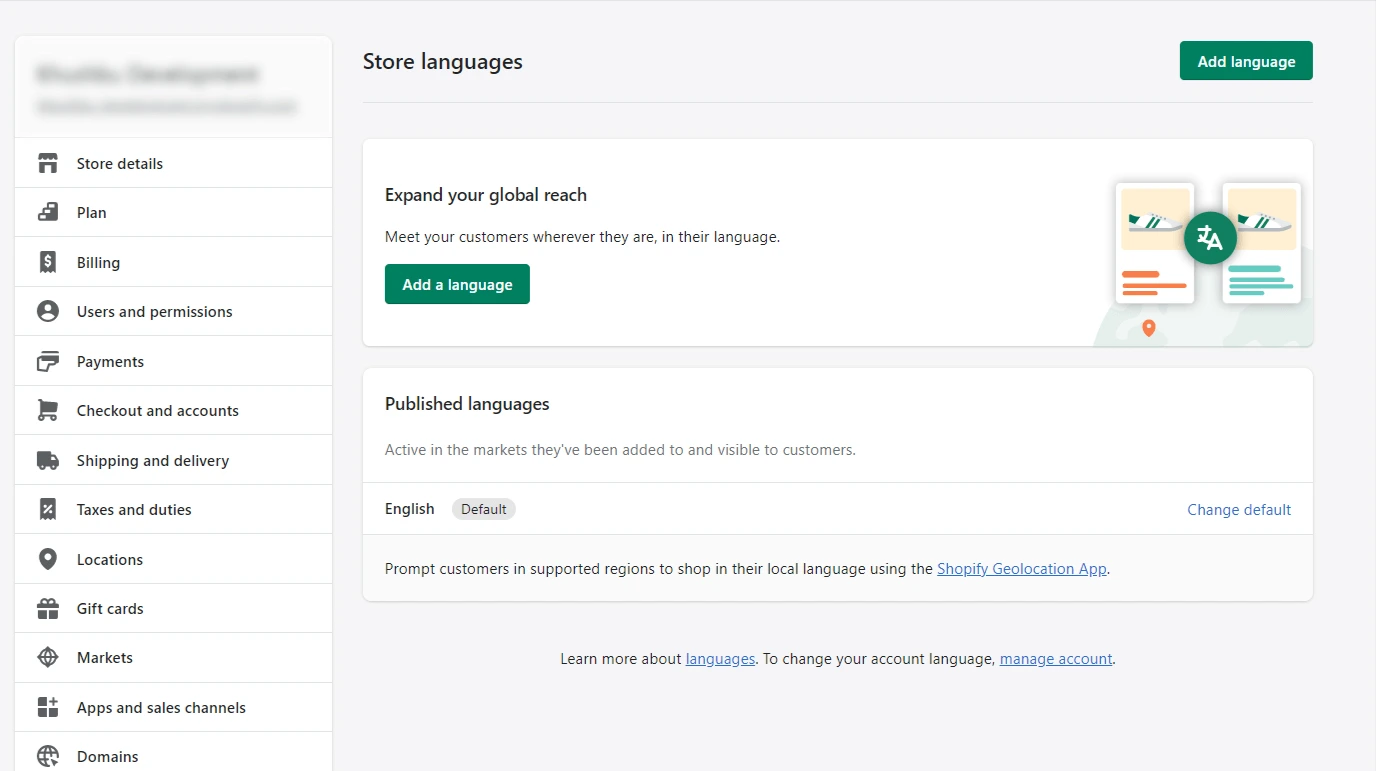
- Log in to your Shopify admin.
- Go to Settings > Languages (or similar localization settings).
- Add the languages you need for that market.
Make sure you also localise:
- Currency and tax settings
- Shipping rates and delivery options
- Content, promotions, and legal pages for each region
Local language content plus region-specific SEO is one of the strongest GEO signals you can send for each store.
Step 5: Use on-brand, fast Shopify store design
The way your stores look and feel should be consistent with your brand – but also optimised for performance.
- Choose or build a fast, SEO-friendly Shopify theme that works well across all devices.
- Apply consistent branding (logo, colours, typography) across all your Shopify storefronts.
- Keep navigation structures similar so customers recognise your brand instantly.
Shopify offers many free and paid themes, and you can also hire a Shopify theme developer to customise layouts, sections, and performance. A well-coded, SEO-friendly theme can significantly improve your search visibility, Core Web Vitals, and conversion rate.
Step 6: Centralise customer service and operations
With multiple stores, customer service can quickly become fragmented if you don’t centralise it.
Set up a centralised support system that can:
- Track orders and enquiries from all Shopify stores in one place
- Route tickets to the right team members
- Give customers consistent responses and SLAs across brands and regions
You can use shared email inboxes or a helpdesk solution (for example, Zendesk or similar tools) to manage tickets from all your stores. This improves customer satisfaction, reduces miscommunication, and helps you maintain a high level of service as you scale.
SEO & GEO best practices for multiple Shopify stores
When you run multiple Shopify stores, SEO and GEO targeting become even more important. Your goal is to avoid duplicate content issues while sending clear signals to search engines about which store serves which audience.
- Use a clear domain strategy: choose between country domains (example.de), subdomains (de.example.com), or subfolders (example.com/de/) and be consistent.
- Localise key pages: translate product titles, descriptions, collections, navigation, and blog content instead of reusing the same English copy everywhere.
- Adapt metadata per market: write localised meta titles and meta descriptions with country- and language-specific keywords.
- Manage canonicals: avoid having multiple stores compete for the same query with identical content.
- Align with local search behaviour: optimise each store for local phrases (for example, “Shopify store development agency in Germany” vs a generic “Shopify agency”).
Done well, a multi-store setup helps you own more SERP real estate across different regions instead of diluting your rankings.
Team, roles, and processes for multiple Shopify stores
Technology is only half the story. To keep multiple Shopify stores running smoothly, you need clear ownership and processes.
- Define owners per store: who owns merchandising, content, pricing, and promotions for each store?
- Use staff accounts and permissions: give your team the access they need, but avoid “full admin for everyone” to reduce risk.
- Standardise workflows: use shared SOPs for product launches, discounts, theme changes, and releases.
- Plan deployments: avoid pushing major theme or app changes to all stores at once without testing them on a staging store first.
Clear governance reduces mistakes, protects your brand, and makes scaling from one to several stores much less stressful.
Analytics and reporting across multiple Shopify stores
Multiple stores only make sense if you can clearly see which regions, brands, and channels are driving profit.
- Unify tracking: make sure all stores use consistent analytics tracking (for example, GA4) with clean naming for events and conversions.
- Monitor KPIs per store: track revenue, conversion rate, AOV, and key funnels per store so you can compare performance.
- Build cross-store dashboards: use a reporting tool to see all your stores’ metrics in one place and compare regions and brands.
- Review regularly: run monthly and quarterly reviews to decide which stores need UX, SEO, or performance work.
This turns your multi-store setup into a measurable growth strategy instead of just “more complexity”.
Typical challenges with managing multiple Shopify stores
Multiple Shopify stores can unlock growth, but they also introduce complexity. If your team or processes aren’t ready, things can become messy very quickly.
1. Product data and catalog structure
If each store structures product data differently (titles, SKUs, tags, collections), your catalog becomes hard to maintain and even harder to report on. Align your product data model across stores so:
- Each product has consistent identifiers and attributes
- Collections and filters work similarly in each store
- You can clearly see which products and channels perform best in which regions
2. Product availability across markets
Customers get frustrated when they discover products are out of stock in one store but available in another. Seasonal collections, regional assortments, and different price lists can make this even harder to manage.
Define clear rules for:
- Which products are sold in which stores
- How you handle discontinued or region-specific items
- When and how new collections are rolled out across markets
3. Inventory management across multiple stores
If you’re fulfilling orders for multiple stores from the same warehouse, you need a reliable multi-store inventory strategy. Without it you’ll struggle with:
- Accurate stock counts across all channels
- Split or delayed shipments
- Reporting on gross margin and performance per store
4. System integrations (ERP, POS, WMS)
Connecting multiple Shopify stores to systems like ERP, POS, or WMS adds another layer of complexity. Each integration needs to know:
- Which store owns which orders
- How stock updates flow back to each storefront
- How pricing, tax, and discounts should behave per region
Poorly planned integrations can consume a lot of time and create data inconsistencies, so invest in a clear integration architecture from day one.
5. Order and return management
With multiple Shopify stores, you’ll manage orders, returns, and refunds for each store separately – or via a central OMS. Without strong processes, this can lead to:
- Slow refunds and exchanges
- Inconsistent return policies across regions
- Higher support load and lower customer satisfaction
Checklist before you launch an extra Shopify store
- You have a clear reason: new country, new brand, or new customer segment
- You’ve defined product assortments and pricing per store
- You have a plan for inventory sync and order management
- Your theme and apps are tested for multi-store setups
- Your SEO, GEO, and localization strategy is documented
- Your team knows who owns what and how releases are handled
FAQs on running multiple Shopify stores
1. How much does it cost to set up multiple stores on Shopify?
The total cost depends on how many stores you run and which plans you choose. In general, you’ll pay:
- A separate Shopify subscription for each store (unless bundled via Shopify Plus)
- Any paid themes you use (one-time or subscription)
- App costs per store for things like inventory sync, translations, marketing, and reporting
- Optional costs for custom development, integrations, and ongoing maintenance
If you’re planning a multi-store setup, it’s smart to model the total cost of ownership per store (platform, apps, team, and agency costs) against the expected revenue from each region or brand.
2. How many Shopify domains can you have at a time?
In addition to your myshopify.com URL, you can connect multiple domains and subdomains to your Shopify store.
Shopify allows one primary domain per store, plus additional domains and subdomains that can redirect to it
or be used for other storefronts (for example, regional domains).
3. Can I have multiple Shopify stores?
Yes. You can create as many Shopify stores as your business needs. Each store can have its own:
- Branding and theme
- Currencies, tax rules, and shipping methods
- Apps and integrations
- Team permissions and workflows
4. Can I have multiple stores on one Shopify account?
You can manage multiple Shopify stores with the same email login, but each standard store has its own subscription. Shopify Plus customers can also get multiple “expansion” stores under one Plus organisation, which is better suited for larger, high-traffic brands managing multiple regions or brands.
5. Why build multiple Shopify stores instead of one big store?
Common reasons include:
- Different countries or regions with unique languages, currencies, and taxes
- Separate branding or positioning for different product lines
- Dedicated B2B and B2C storefronts with different pricing and experiences
- Focusing a store on a single niche or customer segment to improve SEO and conversion
6. Can I have multiple domains on Shopify?
Yes. Shopify supports multiple domains per store, but only one can be set as the primary domain. Additional domains can be used for regional storefronts, language variations, or campaigns, and can help with GEO targeting when configured correctly.
Final verdict: Is a multi-store Shopify setup right for you?
A multi-store Shopify strategy can be incredibly powerful if you’re expanding across markets, brands, or business models – but it also adds complexity in inventory, operations, and support.
If you’re still early in your eCommerce journey, a single, well-optimised Shopify store is often easier to grow. As you scale and start to hit limitations (international SEO, complex pricing, multiple brands), adding new stores with a clear strategy makes more sense.
If you’d like expert help planning or implementing your multiple Shopify stores, you can always contact our dedicated Shopify developers to review your setup and suggest the best approach for your business.